Showing posts with label Kids Safety. Show all posts

Tuesday, 27 November 2018

TECHNOLOGY AND UNHEALTHY EATING HABITS OF KIDS; USE PARENTAL CONTROL APP NOW!

TECHNOLOGY AND UNHEALTHY EATING HABITS OF KIDS; USE PARENTAL CONTROL APP NOW!

The average age at which kids start using smartphones is 11. As soon as they get hold of a phone they start using the internet, social media and various other applications. It doesn’t take much time for them to get dependent on their phones.

Yes, kids like adults get dependent on their smartphones and some even get addicted. They get so engrossed in them that they lose track of time, sleep, and eating. Tweeting about a hot topic or their favorite show, reading books or playing games causes them to develop bad eating habits and skip meals altogether. The use of parental control app is becoming necessary with each missed meal.

This is what happens if meals are not taken regularly:

  • They can get weak. 
  • Develop a nutritional deficiency. 
  • Have a low immune system. 
  • Get prone to getting a disease like diabetes. 
  • They won't have the energy to do schoolwork or daily chores. 
  • May collapse due to physical exertion. 
  • They can gain a lot of weight at once. 
  • May eat more junk food to make up for the missed meals.

Set curfews using Parental Control App:


It is important to set some limits to the screen time. There are a lot of parental control apps that help to do so. FamilyTime is a one such app that provides this feature. You can lock the kids’ phones remotely and cut short their screen hours. You have to set up rules as per your will and the app handles the locking and unlocking of the phone. If they are at home or outside, they will be reminded to have their meal on time. FamilyTime app offers many valuable features to do that including:

  1. Dinnertime: There is a predefined rule for meal times. Enter the start and end time of the curfew and recurrent days if any. Their phones will lock down, causing them to have proper meals. 
  2. Customized rules: You can make your own rules to enforce this habit multiple times a day. 
  3. Setting up Daily Limits: Set screen limits on a daily basis and curb device use during dinner, bed, and study time etc. 
  4. Implement Family Pause: Whenever you feel the need to stop their device use, you can implement phone lock in one-touch. This is a handy feature for unplanned limits and digital detox. 
  5. Provide Them TimeBank: Kids can save their screen time minutes in their TimeBank and can use it whenever they wish to. This feature helps them know the importance of time and productive use of screens etc. 

And a lot more. The app has a long list of features that parents can benefit from. So, get the app now and give a free try to each one of its features and see yourself how does the app work for you and your kids. Another good news is that you can customize settings for each child and device individually from your parent dashboard. You can get the app now from the app store on your phone. So go now to the Google Play or iTunes on your device and install the app from there or click the buttons below:
parental control app

parental control app

Smartphones are taking over our lives and making our kids lose their health. Take a stance against overuse of technology and use a limit screen time app that can help you regulate their lives. Replace some tech time with healthy habits and quality family time.

Thursday, 1 February 2018

3 KEYS TO GET CONNECTED WITH YOUR TEEN!

3 KEYS TO GET CONNECTED WITH YOUR TEEN!

Adolescence is not the same for everyone, but there are things common to everyone, such as the concern to make decisions for themselves or the need to answer the question "who am I". Be that as it may, the key for parents to connect with their adolescent children is, basically, to focus on the relationship with them.

Here are some effective ways for parents to stay connected with their teenage children.

1. Ask questions and listen


The first step to understanding a teenager is to ask questions, but not any kind of question. The questions must be asked strategically so that it is opened and answered.

Being too direct or going too far to the point will only encourage the teenager to close. It is necessary to involve him in the conversation, to make him feel involved and, above all, to see that we are interested in what he thinks (more than what he does).

In addition, you must be available to speak at any time.  For most teenagers, that means talking late at night, often on topics that seem trivial, or at the most inopportune times you can imagine. But it's okay. If your teenager claims you, talk, or rather listen to him and wind him up to keep talking.

If you are a good listener your son will tell you many things, he will vent to you and ask you for advice. If you do not do it, you'll have to look for that outside. So do not miss a single opportunity, even if it is the worst moment in the world. And make sure your child knows that he can count on you always and at any time.

2. Employ family locator App

family tracker app

Family tracker app

Another nice idea to stay connected to your teen is staying aware of their locations and activities from a distance. To do that, you can take the assistance of advanced family locator app such as FamilyTime that helps parents see the changing locations of their kids and their digital activities from a distance. There is a lot more parents can do with this app in hand, such as app monitoring, Web monitoring, call log monitoring, SMS tracking, contact mirroring, setting screen limits, allowing specific screen time hours for a week and remotely locking their device from a distance etc. Want to give it a try for free? You can! Get the app now from the app store on your phone or simply click the buttons given below!


3. Look for opportunities to be together


Eating and / or having dinner together is a habit that should be established in adolescence. If it is not possible to make two meals with your children, at least try to make one. It is a fantastic opportunity to deal with everyday issues, learn about your children and make yourself known, not to mention how important it is to monitor eating habits at this age.

In addition, you should plan weekend activities regularly, such as field trips, recreational trips or sports activities. But make sure your children want to do that, because if you program something they do not like you will get the opposite of what you are looking for. A good way to get it right is to schedule activities with them.

Monday, 24 July 2017

REGULATE YOUR TEEN’S SCREEN USE WITH THE HELP OF SCREEN TIME APP

REGULATE YOUR TEEN’S SCREEN USE WITH THE HELP OF SCREEN TIME APP

When it comes to maintaining a positive digital citizenship for your child, regulating their screen use comes first. Because a disproportionate screen time is the root cause of many digital slip-ups. Too much screen time not only exposes your child to digital traps on the web but also interferes with activities like spending time with friends and family, being physically active in sports, doing homework efficiently etc. Teenagers who use their cell phones all day long suffer from sleeping
disorders, attention problems and obesity.

Screen Time Tips for parents


For teenagers, screen time includes activities like researching for a school project, interacting with friends on social sites which usually takes most of their precious time and playing video games online. But, apart from these activities, exploring adult websites and pornographic content has also become common among teenagers which leave quite damaging effect on their minds.

Parents need to make screen time productive for their kids. Here are some tips to help you do it!

  • Provide your teen chances to explore his or her interests and hidden talents. For instance, if your child likes to swim, encourage them to take part in swimming competition or if they like to act, ask them to enroll themselves in an acting class.
  • Plan family time with your child and keep screens away during that time. You can take your teen to a walk or for a lunch etc.
  • Keep them engaged in DIY projects. You can take help from several step-by-step tutorial available on the net. Assist your teen in their new DIY project.
  • Make a rule of “no screen time” during meals and homework hours.
  • Teach your teen about the challenges they might have to face online. Educate them about cyberbullying, sexting, porn addiction, violent video games and the dire consequences these digital traps may inflict on them. 

No matter what, screen time should never replace the time needed for the activities like sleeping, eating and playing. Display an ideal behavior in front of your kids. Don’t use your cell phone during mealtimes or while driving to model a substantial conduct.

Screen Time App for Parents


Most of the smart parents use screen time apps to regulate their child’s screen use. If you are still not one of those parents, you need to start considering it. Install a screen time app now and make your life easy!

One such app is FamilyTime. Using FamilyTime, parents can schedule an auto screen lock on their teen’s device. FamilyTime even enables parents to lock teen’s device anytime they want. Sounds interesting? Download the app now and explore several more valuable features! Click the buttons below to get the app!

screen time app screen time app

Wednesday, 7 September 2016

Ensuring Safe Screen Time with a Limit Screen Time App

Technology and electronic devices are now considered a part of human life. It is no longer something foreign but an integrated component of our daily life. The kids literally grow up with these devices. They do most of their school and other daily tasks with the help of internet. The screen time is now called simply as “time”.


While the normalcy can’t be denied, it is also a fact that excessive or continuous device use is injurious to health. It not only affects the physical health, but also the mental well being. It is responsible for obesity and eye damage at a young age. Body pain, incorrect posture, sleep deprivation and hormonal imbalance are also caused by the blue light emitted from these devices. It increases the risk for depression and social anxiety. The human attention span is also shrinking due to it.

Reduce Screen Time


In this situation, the fitting solution seems to be the reduction of screen time and keeping it within a limit. Instead of fretting over the health of our kids why not control their device use and schedule it in a way that it becomes safe. Screen addiction is pretty much real and it works like any other drug addiction. Its withdrawal causes irritation and agitation. That is why it is important that parents control it right from the beginning.

How to Reduce Screen Time?


Technology itself has proposed a way and that is in the form of a limit screen time app. Apps like FamilyTime allow parents to schedule their kids’ device time. There are different limits or rules that can be set. It works like a digital curfew during which kids cannot use their devices.

The device locks down and the kids cannot do anything about it. They have to do something else. This way they are engaged in other activities like games and spend time with family. Apply screen limits during meals so that the whole family can have uninterrupted dinner together. During study hours so they can solely concentrate on their assignments. At night so they can have proper sleep without any beeps or dings intruding and wake up fresh in the morning. Other than that you can make a schedule for weekends and holidays when they have more time to spend with their devices. Do other activities instead like outdoor games, yoga, cooking, baking, art and crafts etc.

Get FamilyTime for your Android or iOS device.


Limiting For the Good


So it is clear that a midway solution that suits both the parents and the children is to keep the screen time within safe hours. It can be easily done using a limit screen time app. Most parents are taking up digital monitoring and parenting. Screen time management is also a part of that. Keep your kids safe and give them a better digital life, establish screen time limits for your house. It fulfills your kids’ basic need, all the while keeping the health hazards at bay.

Tuesday, 10 November 2015

Geo-Fencing Alleviates Parents In No Time!


“Are you back home?” “Give me a call as soon as you reach school safely” bla blah… There are dozens of concerning statement parents make every day. No matter how busy they get, calling kids to know their location stays their priority. For all the concerning parents, there is a tool available that they can use to Geo-Fence places. The tool is FamilyTime-parental control app. Using the app’s Geo-fencing feature, parents can create a virtual fence around places their kids visit frequently.

How does Geo-Fencing Help?


The feature itself is a great relief for parents. As the name suggests, Geo-fence feature helps parents create a virtual fence around places. Once Geo-fenced, parents can receive automated check-in and check-out alerts from their kids. Using FamilyTime, you can:

  • Geo-fence as many places as you want just by entering the addresses.
  • Set the radius say in feet or miles so that you can receive instant alerts as soon as the kid enters or exists the defined radius.
  • Receive push notifications about the check-in/ check-out.

SOS:


SOS alerts are the panic alerts that your kids can send you in a single tap in emergency situations. With the alert, you can receive complete location details of your kid so you can rush to them in time.

Does this sound like a wish came true right? You can download this app anytime from iTunes and Google play and use it on all versions of iPhones, Android, and Kindle devices.


Stay Informed, Stay Relaxed!


Staying informed is the peace of mind. You can always receive automated alerts about your kids checking in and checking out using the advanced Geo-Fencing tool such as FamilyTime. Stay relaxed, stay notified and enjoy parenting!

Monday, 27 July 2015

3 Parenting Tips for Mums to balance Family and Work


The majority of mothers is working now. No matter, you are a single mother or have a partner, balancing between family and work is tough. You have to shuffle between both. Your kids constantly complain about you not spending enough time with them, but kids don’t understand that you are working for their future’s sake. This might incite a feeling of guilt and stress in you but toss these feelings aside. Your work can’t restrain you from keeping a strong bond with your kids. You can always be there for your kids when they need you.

You might be wondering how can you do that without exhausting yourself completely. Well, here are a few tips to help ease parenting while you work:

Hire Good Child Care


Teens and preteens always need adult supervision. In the absence of parents, someone should be there to take care of them when they get to the home. Lack of adult supervision can lead to teens ending up on the wrong path. Hire a trustworthy caretaker for your kids.

Stay Connected Digitally – The Smart Way


Let’s face it! You cannot always have time to call your children and ask them where they are, what are they doing, etc; although you are worried about them wondering whether they are back home or not. Well, it’s time to take a step into the smart parenting world. Like many parents, you can make parenting an easy job. You can use parental control apps such as FamilyTime to stay informed about kid’s whereabouts and can always be there for them. This app is all inclusive, feature packed and affordable. A great aid for working mums to keep track of your teen’s location as well as online life. Don’t have this app? Download it for free from your iPhone or Android phone, or just click the buttons below:


FamilyTime

FamilyTime


FamilyTime has a wide range of interesting features; it gives parents the control to:


·          Monitor their teen’s location along with the date and time stamps.
·          Geo-fence locations, i.e. home, school, etc. to receive check-in and check-out alerts.
·          Receive Pick Me Up alerts from their kids.
·          Receive SOS alerts along with complete location, in case of emergency.


FamilyTime


This app has many other features like Blacklisting apps on your child’s phone, web-monitoring, watchlist their contacts and many more. This app can help you a great deal in managing work and family, both at the same time.

Have Special Family Activities


When you make time for your kid’s, plan all the fun.  You can play board games at night, or watch movies with them. The real idea is to nurture your bond and involve all members of the family in something mutual. You can sit together at meal time too. It doesn’t always matter what you do, as long as you’re doing it together.

Family Comes First


Yes! Family comes first before anything in this world. Being a working mother, you have to take care of two big responsibilities. Confessing that it is really tough doing than said, but remember  the saying of Churchill “ There is no way to be a perfect mother and a million ways to be a good one!”  


Tuesday, 16 June 2015

Can Parental Controls for Internet Help Reduce the Harm to Kids - How?

Parental Control App

Well, we all discuss the dangers and negative impacts of excessive Web usage and many write and generate awareness on this topic too. But unfortunately, very few of us pay attention to how we can reduce such adverse impacts. It’s time to find out the answers to “how”.  Blaming the Internet for the problems kids are facing is a completely out of question. It’s a useful resource so let’s keep it that way. First of all, teach the kids to be good and wise digital citizens and use parental controls for Internet to actively monitor them.

What Harms Internet Can Cause?


You will get ample info on any topic you put in to your browser for search. You can get a deep and thorough search result on anything you want to surf. From books to movie to natural calamities, Web is a great resource. But the problem is that our teens can’t make right choices when searching on the Web. They are eager, they are adventurous and extremely risk-taking. They can easily search for the adult content and images and can get addicted to those. The biggest threat is the pornography. A huge number of teens are regularly visiting the porn sites and getting addicted. Moreover, they can connect to anybody at any time even strangers who can sometime cause harm to your children.

The chat rooms are full of teen subscribers now are actively using the chartroom to connect with random unknown people and making friends. Such unknown friends could be predators, stalkers or bullies who can abuse their personal data and harm them seriously. Monitoring the Web usage of teens is becoming necessity and for these reasons, parental apps are the best choice.


How can Digital Parenting Defend?


It’s not that you should be a helipad parent and stay over their shoulders all the time. But you can simply stay in a loop and monitor their Web behavior. Such digital monitoring can keep you updated with any questionable Web preferences of your teens and can let you control Web abuse. FamilyTime is also a fine Internet safety tool as it’s a neat app for keeping the kids protected while surfing on the Internet. You can avoid teens’ exposure with the adult content, pornography, questionable sites and keep them secure.

How FamilyTime Protects?


FamilyTime is a handy tap that you have to install on the child’s phone. After that you can:


  • Check their entire browsing history.
  • Check their bookmarks and favorites.
  • Check their most visited sites along with the time spent on each site.

FamilyTime is also available for parents. This means that parents can install their version of the app on their smartphones and can monitor and manage their children’s digital lifestyle from their own phone or tab! Azizolious is the developer of FamliyTime. The app is free and can be downloaded on iPhone and Android by clicking on the buttons here:

      Parental controls for Internet
      Parental controls for Internet


This is how you can gain a fair idea of their interests and preferences on the Web. So if they go for any online dating, drug related, or adult sites you can quickly get informed and stop them from getting addicted.

Keep Web Safe- Let Teens Enjoy!


With the above mentioned FamilyTime specs, you can stay in the know about what are the sites in which they take interest, which sites they visit for long hours, and which sites they visit the most. This way, you can keep a check and stop them at the right time. So take my advice seriously and use parental controls for Internet and keep it a useful resource for your adventurous teens.

Wednesday, 20 May 2015

Internet Protection Software- Stop Kids Being Mean On the Screen


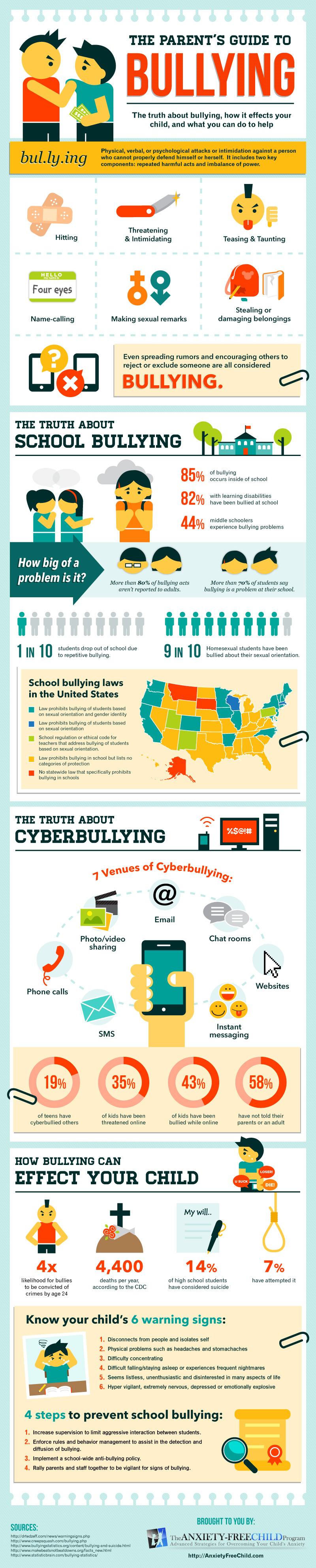
Is your child being bullied online? Well, you aren’t alone; it’s very common issue because insecure kids are bullying others to feel superior. Hate messages and images are on the rise and we all must understand the reason behind growing cyberbullying. It’s increasing because today’s parents are not able to help kids overcome their fears. Use Internet protection software that can empower you to protect your children and protect other’s kids online, too.

The Secret Behind Mean Online Behavior

Teens are deliberately sending messages and using chat rooms and pagers to threaten and intimidate innocent kids online. It is so easy for them to harass others and hide themselves. It can mess up with the thoughts of the one who is being bullied. No child can behave normally after becoming a victim of insult, ethnic slurs, rumors and hateful messages.

I came across an Infographic at Anxiety Free Child, which explained the trends in cyberbullying and its impact. Have a look because its growing issue and your kid could be at a risk, too.


Don’t consider the threats only for your kids because your kids could also bully others and over-looking this fact could be dangerous, too.

Internet Monitoring - Stop Cyberbullying


Don’t let the kids hold it in; the bullied kids who don’t share what happed online could become victims of low self-esteem, lack of confidence, poor body image and aggressive attitude. If you choose to ignore what your kids do online, they can become mean online. It’s a vicious cycle: your bullied kids will bully others online and the cycle won’ break unless, you use some parental control app to monitor their online activities.

As cyberbullying is increasing, the need for the parental Internet monitoring is increasing too. So keep a check and don’t let this wildfire ruin kids’ well-being. You can go for FamilyTime app. It offers a range of features and parental controls to help you keep tabs on your teens.


FamilyTime - An innovation for Parents


As I mentioned in my previous blog post, I was eagerly waiting for the launch of the FamilyTime app, which was scheduled for this month. I’m excited to share that the app was successfully launched a few days ago. I’ve had the chance to try it myself, and I can confidently say that FamilyTime is an excellent parental control app designed to ensure children’s online safety.

Mr. Aziz Ahmed has truly produced an innovative solution that helps parents protect their kids in the digital world.

The app empowers parents to monitor their children’s online activities, giving them clear insight into what their kids are doing and alerting them to any potential concerns. With the FamilyTime parental app, you can:
  • Track their web history
  • Check the Websites they visit the most
  • Keep check on their favorites and bookmarks
  • Manage Kids ScreenTime
  • View Their Locations
  • Monitor Contacts


Don’t let Kids be Mean on Screen, Fight Cyberbullying!


With the use of the Internet protection softwareyou can monitor all of the kids’ online activities. This way, you can protect your kids from being bullied and also stop them from bullying others. FamilyTime app is not a spyware and therefore can be your fool-proof tool to fight cyberbullying. Use FamilyTime and stop Internet bullying smartly!

Thursday, 2 April 2015

An Economical App for Single Parents among the Top Parental Control Apps

After my divorce, last entire year was another name of anxiety for me. It wasn't about my separation but the guilt that I have ruined my kids’ life. I wasn't able to give them my time and this is what they needed the most. If you too are passing through this I would suggest you to stay in touch with them all day long by using top parental control apps.


Parental Control App


Kids Might Act Out


Due to unwanted change in their life kids are most likely to feel out of control, angry, sad and at times they might hold them responsible for the divorce. This is what I went through. Such kind of decision you took for you can harm their personality and behavior. Aggressive behavior, depression, drug addiction and much more behavioral outcomes could come to your notice.

There is a 7 times more likelihood that the children from divorced parents suffer from depression and mental stress. The suicidal attempts, teen pregnancy, and violence crimes all are more common in single parent families. If you are a stressed single mom, you are not alone in this situation.

Business2community has introduced an interesting and informative inforgraphic about the status of mothers.

As per this inforhgraphic 45% of mothers are divorced, widowed or separated, so it is quite alarming because we can’t avoid the single parenting challenges. This is why use of parental control apps is becoming a must have these day.


An affordable choice


I heard from a tech-savvy friend that Mr. Aziz Ahmed, a passionate tech enthusiast, is planning to launch a parental control app called FamilyTime next month. He's particularly focused on enhancing online safety for children. The app includes the following features:

Features:

  • Track kid's GPS location
  • Send them instant messages
  • Check where they have been all day
  • View their Web browsing history
  • Check their bookmarks
  • View most visited sites
  • View installed apps
I'm looking forward to the launch of this app and am eager to try it out. Ideas like this can be incredibly helpful for single parents in managing their kids' online activity. As a tech blogger, I plan to use the app myself, and if I find it valuable, I'll definitely write more blog posts to recommend it to other parents.